The Silent Nightmare of Background Data Leaks
Imagine checking your phone on a quiet Sunday morning, only to see fifty automated alert emails screaming that your client database is completely open to the internet. That was my exact reality a few years ago when a tiny software update silently broke our background security rules. You do not need to be a massive tech enterprise to have your digital doors kicked in by automated bots. Today, I am going to show you exactly how to lock down your daily workflows so you never have to feel that kind of panic.
That terrifying night changed my entire perspective on how we handle digital information. When you set up automated systems to save time, you often forget that you are moving extremely valuable assets across invisible digital highways. You just assume the software will handle everything perfectly. But the reality is that background syncs are where some of the biggest leaks happen.
Regular business owners and software managers face this silent threat every single day. You probably wake up worrying about whether your automated marketing tools are secretly exposing client emails. You might lose sleep wondering if a sudden compliance audit will uncover massive security gaps in your daily operations. This constant underlying anxiety steals your peace of mind.
You try to trust the default settings on your software apps, hoping they have your back. But deep down, you know that hoping for the best is not a real security strategy. When systems run on autopilot, you lose that direct manual oversight, leaving your most valuable asset—customer trust—completely vulnerable.
If you have ever felt that cold sweat worrying about where your customer details are actually going, you are absolutely not alone. We all want the massive time-saving benefits of AI and software automation. But we also need the absolute certainty that our digital doors are locked tightly.
Fast Action Guide: What You Will Learn Today
- The Digital Armored Truck: How to force end-to-end encryption on your background apps.
- Zero Trust Mindset: Why you must make your software verify its identity every single day.
- API Gateways: The simple way to build a heavy security door for your data traffic.
- Cleaning House: How deleting old data actually makes your business much safer.
Rethinking How We Protect Moving Digital Assets
Securing your automated systems does not have to be a complicated, nightmare project. You just need to build a solid foundation of smart habits and clear rules. Let us break down exactly how you can lock down your background operations and get your peace of mind back.
You need a practical approach to make sure your information stays completely invisible to bad actors. By applying a few logical, scientifically backed security concepts, you can build an automated workflow that acts like a digital fortress. Here are the exact steps you need to take right now to secure your daily operations.
Protocol 1: Wrapping Your Data in Unbreakable Digital Armor
Think of your customer information as physical cash. You would never put a stack of hundred-dollar bills into a clear plastic bag and hand it to a stranger to deliver. You would put that cash inside a heavy, locked armored truck.
In the digital world, end-to-end encryption is your armored truck. When your automation tool picks up a customer's email address from your website and moves it to your email marketing software, that text must be scrambled instantly.
If a hacker somehow intercepts the transfer, they should only see a massive wall of random letters and numbers. You must ensure that your data is encrypted both "at rest" (when it sits in your database) and "in transit" (when it moves through the cloud).
Check your integration platforms and API settings today. Look for options that specifically mention high-level encryption standards like AES-256. If your current automation provider does not offer this basic scrambling feature, it is time to find a new provider immediately.
Protocol 2: The Digital Bouncer (Strict Identity Verification)
Just because two software applications are connected does not mean they should blindly trust each other. You need to set up strict rules about who gets to access what. Imagine a very strict bouncer at an exclusive club who checks IDs every single time someone walks through the door, even if they just went outside for a minute.
This concept is often called Identity and Access Management. When your billing software asks your customer database for credit card details, the database should demand immediate proof of identity.
You do this by using secure authentication tokens rather than permanent passwords. These temporary digital passes expire quickly, meaning that even if someone steals the token, it will be totally useless in a few minutes.
Always practice the rule of least privilege. Your automated tools should only have access to the exact pieces of information they need to do their specific job, and absolutely nothing more.
I actually learned this lesson the hard way a few years ago. I left global admin permissions turned on for a simple calendar booking app, thinking it would prevent sync errors. I later realized I had essentially given the keys to my entire customer database to a simple scheduling tool, which was a massive, unnecessary risk. Keep your permissions incredibly tight and always question why an app needs certain access.
Quick Rule Book: App Permissions
| Action | Do This | Never Do This |
| :--- | :--- | :--- |
| Connecting new apps | Give access only to specific folders | Give global admin rights |
| API Keys | Rotate and change them every 30 days | Leave the same key active for years |
| Employee Access | Set up temporary passes for projects | Share main passwords via chat apps |
Protocol 3: Building a Smart Alarm System for Background Syncs
You cannot protect what you cannot see. When things happen automatically in the background, you might not notice a problem until days or weeks later. That is why you need a highly sensitive digital alarm system that watches your cloud traffic around the clock.
Continuous monitoring means having a software tool that acts like a security camera for your data pipes. It constantly watches how information flows between your servers and looks for anything strange.
If your system usually moves fifty customer records an hour, and suddenly it tries to export ten thousand records at midnight, your alarm should go off instantly.
Want to see exactly how these automated triggers work in real-time? Check out this highly detailed visual walkthrough that explains how to spot strange network behavior before a breach happens.
Set up automated alerts that send a direct message to your phone or priority inbox the second something looks suspicious. The faster you know about a strange data request, the faster you can shut down the connection and protect your clients.
Myth vs Reality: The Truth About Cloud Automation
Let us clear up some massive confusion about how cloud security actually works. Many business owners operate under dangerous assumptions that put their entire operation at risk.
The Myth: My cloud hosting provider takes care of all my security automatically.
The Reality: Cloud providers only secure their actual server buildings and underlying network. You are 100% responsible for how you configure your apps, who you give access to, and how you transfer your own information.
The Myth: Hackers only target massive corporate enterprises.
The Reality: Automated bots constantly scan the internet looking for any small business with open API connections and weak security rules. Small businesses are actually easier targets because they rarely monitor their background traffic.
Protocol 4: The Zero Trust Security Mindset
We are used to trusting things once they are inside our network. In the past, if an app was approved once, it could freely wander around your server forever. That old way of thinking is completely broken today.
You need to adopt a Zero Trust mindset. This literally means exactly what it sounds like: never trust anything, and always verify everything.
Every single time your automated invoice generator tries to pull a customer's home address, the system must force it to prove its identity again. It does not matter if the app has been connected to your server for five years.
This constant checking might sound like it would slow your systems down, but modern software handles these verifications in milliseconds. Implementing this mindset completely blocks hackers from sneaking into one weak application and freely moving into your more sensitive databases.
Protocol 5: Masking and Tokenizing Highly Sensitive Details
Sometimes, you have to move incredibly sensitive information like social security numbers or full credit card details. Encryption is great, but tokenization is an even stronger strategy for automated workflows.
Instead of moving a real credit card number through your cloud network, tokenization swaps the real number for a fake, random string of characters (a token).
The real credit card number stays locked tightly in an ultra-secure, separate vault. The fake token is what moves through your automated daily workflows.
If a hacker breaks into your daily workflow and steals the tokens, they get absolutely nothing of value. The tokens cannot be reversed or decoded because the actual mathematical link to the real data does not exist outside the secured vault. This is exactly how major payment processors protect buyers during online shopping checkouts.
Setting Up a Secure API Gateway
Your applications talk to each other using something called APIs (Application Programming Interfaces). Think of an API as a waiter in a restaurant taking your order to the kitchen.
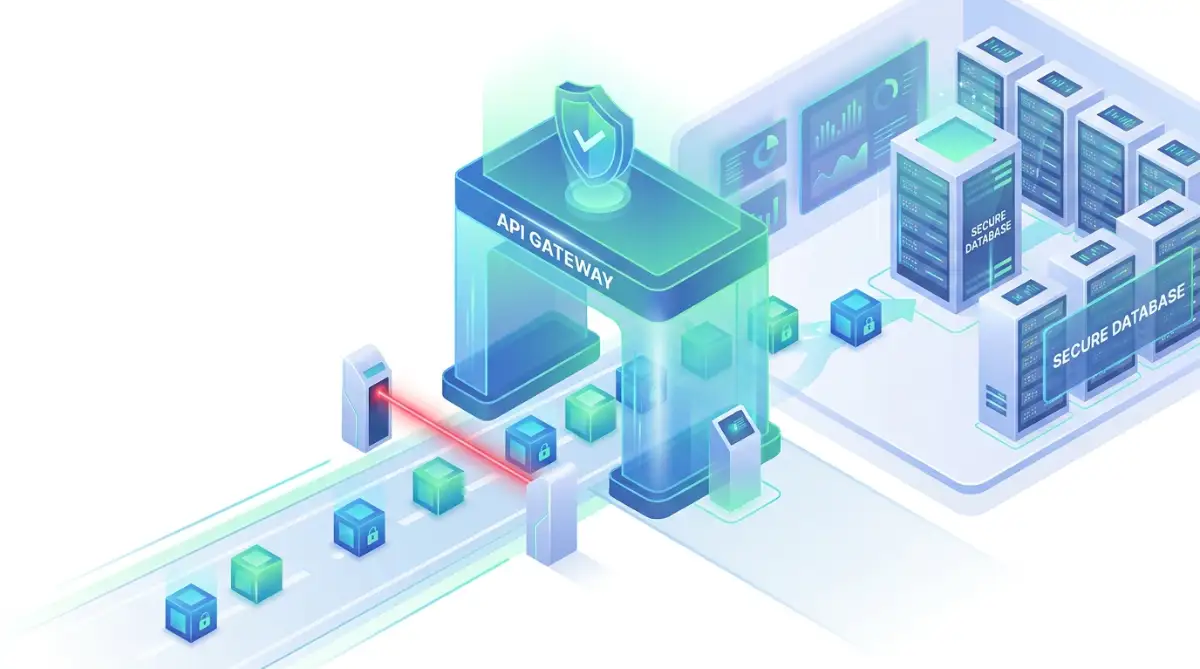
If your APIs are not heavily secured, anyone can walk up to the kitchen window and start taking food. A secure API gateway acts like a heavy, locked door between the waiter and the kitchen.
The gateway manages all the background traffic, strictly enforcing your security rules before any information is allowed to pass through. It limits how many requests an application can make per second, which stops attackers from overloading your system.
It also filters out malicious code that bad actors might try to inject into your automated webhooks. By routing all your automated cloud transfers through a central, heavily guarded gateway, you gain total control over your digital environment.
The True Cost of Ignoring Digital Hygiene
Taking shortcuts with your background syncs will eventually catch up with you. The financial penalties for failing to protect consumer privacy are getting much heavier every single day.
Government regulations like GDPR in Europe and various state laws demand that you treat private information with intense care. If an audit reveals that your automation tools were moving raw data without proper protection, you could face massive fines that easily bankrupt smaller companies.
But the biggest cost is not actually the legal fines. The true cost is the complete destruction of your brand reputation.
Once your customers find out you were careless with their private details, they will leave and never come back. Rebuilding broken trust is nearly impossible in today’s highly competitive market.
A Quick Comparison: Risky vs. Secure Data Transfers
To make things perfectly clear, let us look at the differences between a risky background setup and a highly secure, professional operation.
When you look closely at this breakdown, you can see that securing your digital assets is completely manageable. It just requires you to change how you configure your initial setup.
Mapping Out Your Own Safe Migration Strategy
Before you connect any new software or start a massive digital migration, you need a clear, documented plan. Do not just start clicking "authorize" on every app integration you see.
Sit down and map out exactly where your customer details live right now. Draw a simple diagram on a piece of paper showing how a customer's email travels from your landing page, to your CRM, and finally to your billing platform.
Once you see the entire journey visually, you can start identifying the weak spots. Ask yourself what would happen if the connection between the CRM and the billing platform suddenly broke open.
By taking the time to map your automated routes, you take the guesswork out of your digital protection strategy. You change from being a passive victim waiting for a breach, into a confident professional who controls their own digital borders.
The journey to true data security does not happen overnight. It is a daily practice of making smart, logical choices about how you handle other people's private lives. Your customers trust you to keep them safe, and by following these specific protocols, you honor that trust every single time an automated process runs in the background.
Next-Level Security Measures for Background Syncs
Taking your digital protection to the next level requires you to think like a professional auditor. Basic encryption is a great start, but true safety comes from building layers of defense that work together silently. You need systems that automatically check themselves for errors without you having to intervene daily.
One of the most powerful advanced habits is setting up automated API key rotation. Many business owners connect two software tools and leave the same digital key active for years. This is exactly like giving a contractor a copy of your front door key and never changing the locks after the job is done.
If a hacker quietly steals an old, forgotten API key, they can siphon your private database for months without triggering any alarms. By forcing your systems to generate brand new digital keys every thirty days, you instantly lock out anyone who might have stolen an old pass. You can check out standard API security practices through respected organizations like OWASP to see exactly how key rotation works.
Another massive secret of professional data management is understanding data residency. When your background apps sync information, that data often physically moves to servers in entirely different countries. This means your private client details are suddenly subject to completely different international laws and privacy standards.
You must explicitly tell your cloud providers where your information is allowed to travel. Setting up geographical boundaries ensures that your highly sensitive client files never leave a secure, heavily regulated region. Reading up on strict data privacy regulations directly from sources like GDPR.eu can help you understand these borders.
Mastering the Art of Automated Audits
You should never rely on your own memory to check your security settings. Instead, you need to set up automated compliance audits that run continuously in the background. Think of this as having a robotic security guard walking the perimeter of your digital property every five minutes.
These automated audits scan your entire network to ensure every active connection still follows your strict safety rules. If an employee accidentally changes a privacy setting on your billing software, the audit tool instantly flags the mistake. This allows you to fix the open window before a bad actor even notices it exists.
Many professionals feel overwhelmed by the technical side of building these workflows. However, how to overcome the steep learning curve of visual coding is an entirely manageable process today. Modern drag-and-drop security platforms allow you to build these complex audit rules without writing a single line of actual code.
I use visual builders all the time to set up my own network alarms. You just connect the dots on your screen, telling the system to send you a text message if any user downloads more than fifty files at once. It gives you incredible control without requiring a computer science degree.
Dangerous Blind Spots in Data Automation
Even the most well-meaning teams make terrible mistakes when they try to speed up their daily workflows. These blind spots happen because we get too comfortable with the software we use every day. We assume that because an application is popular, it is automatically safe to connect to our private databases.
These common pitfalls can completely destroy a business overnight. I have seen incredibly smart managers accidentally leak thousands of private emails simply because they rushed a software integration. You have to recognize these silent traps before you fall into them.
The "Set It and Forget It" Trap
The absolute biggest mistake you can make is treating your software connections like a slow cooker. You cannot just turn an API connection on and walk away for a year. Software updates happen constantly, and an integration that was perfectly safe yesterday might develop a massive security hole tomorrow.
When applications update their underlying code, they sometimes accidentally reset their custom security permissions back to default. This means an app you strictly limited to "read-only" access might suddenly gain the ability to delete your entire customer list. If you are not actively monitoring these connections, you will completely miss this dangerous change.
I highly recommend reviewing every single third-party connection attached to your business at least once a quarter. Disconnect anything you no longer actively use. Leaving old, unused apps connected to your network is an open invitation for an attacker to walk right in.
The Hidden Danger of Shadow IT
Shadow IT sounds like a spy movie term, but it is a massive problem happening in your office right now. This occurs when your team members start using unapproved software tools to make their jobs easier. They might connect a free, random AI grammar checker to their work email without asking for permission.
While the employee just wants to write better emails, that unapproved tool might be silently copying every single client message to an unsecured server overseas. Protecting networks from ransomware and massive data leaks often starts by controlling these tiny, hidden app connections. You have to establish clear rules about what tools your team is allowed to use.
Do not just punish your team for trying to be productive. Instead, provide them with a pre-approved list of secure, highly vetted tools they can use freely. When you give them safe alternatives, they stop downloading dangerous random apps from the internet.

Hoarding Unnecessary Client Details
For some reason, we all love to collect as much information as possible from our website visitors. We ask for their home address, phone number, and birth date just to send them a simple digital newsletter. This data hoarding habit dramatically increases your risk level during an automated cloud sync.
The simple rule of digital safety is that you cannot lose what you do not have. If a hacker breaches your automated marketing pipeline and you only collected first names and emails, the damage is very limited. But if that same pipeline was dragging along social security numbers and physical addresses, you have a massive disaster on your hands.
Audit your intake forms and checkout pages today. Strip away every single question that is not absolutely necessary for your immediate business operations. Less data moving through your background pipes means a much smaller target for cybercriminals to hit.
My Personal Rule of Thumb:
If I do not plan to email a specific client or use their details within the next 90 days, I completely scrub their personal data from my active marketing lists and move it to cold storage. Keeping old, unused data sitting in your active automation tools just makes you a bigger, more attractive target for hackers.
Treating Digital Safety as an Afterthought
Many small business owners view cyber safety as an expensive luxury they will worry about later. They think setting up basic firewalls is enough. But protecting your digital environment is just as important as keeping physical systems safe in the real world.
Think about how you maintain your physical home. You would probably read the ultimate guide to indoor solar battery ventilation to ensure dangerous physical fumes never build up in your garage. You proactively install vents to keep your family safe from invisible threats.
Your digital business requires that exact same proactive mindset. You cannot wait for a data breach to start caring about encryption and API gateways. You have to build the ventilation systems and safety locks long before the invisible threats ever reach your front door.
Your Next Steps Toward Total Digital Safety
Taking control of your digital borders does not have to be a stressful, exhausting experience. By breaking the process down into logical, manageable steps, you can secure your entire operation in just a few days. The goal is to build a foundation that protects your clients while giving you absolute peace of mind.
Start by mapping out exactly where your client details live and where they travel every day. Once you can visualize those digital highways, start adding your security checkpoints. Enforce strict identity verification for every single app, no matter how trusted it seems.
Next, upgrade your digital armor by turning on end-to-end encryption for all background syncs. Make sure you are regularly rotating those API keys to lock out any lingering digital ghosts. If you ever feel lost, you can always visit our main resource hub for more guides on navigating these technical setups.
Finally, remember to clean up your digital workspace regularly. Disconnect unused applications, delete old client files you no longer need, and strictly monitor what new tools your team is installing.
There is a huge psychological benefit to getting this right. You will sleep so much better knowing your systems are locked down tight. In fact, learning why automating small digital chores dramatically improves mental health perfectly mirrors the relief you feel when your automated security finally runs on its own.
When you remove the constant underlying fear of a sudden data breach, you free up massive amounts of creative energy to actually grow your business. You stop playing defense and finally start playing offense again.
I used to let the fear of technical mistakes completely paralyze my daily workflow. But once I took an afternoon to map out my connections and lock down my digital doors, a massive weight lifted off my shoulders. You absolutely have the power to secure your own business today, so take that first step right now and protect what you have built.
Common Questions About Cloud Data Protection
What exactly is an API gateway and why do I need one?
An API gateway acts as a heavy security door between your different software applications. Instead of letting apps talk to each other freely, the gateway inspects every single request to make sure it is safe and authorized. You need it because it instantly blocks hackers from trying to overload your system or steal private files through weak connections.
How often should I check my automated software connections?
You should run a quick manual review of all your connected third-party applications at least once every three months. However, you should also have automated monitoring tools running in the background every single day to catch strange activity. If an app has not been used in six months, you should completely revoke its access immediately.
Does end-to-end encryption slow down my daily cloud transfers?
Modern encryption technology is incredibly fast and efficient. While it does add a tiny mathematical step to scramble the text, it happens in milliseconds and will not noticeably slow down your daily operations. The massive safety benefits completely outweigh any invisible microsecond delays.
What should I do if I suspect an unapproved app is reading my data?
The very first thing you must do is instantly revoke that specific app's API keys and disconnect it from your main workspace. Next, run a full system audit to see exactly what files that app accessed while it was connected. Finally, update your team's access permissions to prevent anyone from installing unapproved tools in the future.
Is tokenization better than standard encryption?
They are both excellent tools, but they serve slightly different purposes. Tokenization replaces highly sensitive details (like credit card numbers) with a completely fake string of numbers, which is incredibly safe for background transfers. Encryption scrambles the actual text itself; using both methods together provides the highest level of professional security.
Disclaimer: The information provided in this blog post is for educational and informational purposes only and does not constitute professional legal or cybersecurity advice. Always consult with a certified IT security professional or legal counsel to ensure your data transfer protocols meet the specific compliance regulations required for your industry and location.


