
Let's start with a brutal truth: doing the same mindless computer tasks every day is quietly stealing your life. A few years ago, I found myself copy-pasting customer emails into a massive spreadsheet for three hours straight and thought, "There has to be a better way." You absolutely do not need a computer science degree to fix this mess, and I am going to show you exactly how to stop working like a robot today.
My heart would sink every time I saw a tutorial asking me to open a terminal or run a command line. I genuinely believed that algorithmic automation was an exclusive club meant only for brilliant software engineers. I felt like I was being left behind in a world that was moving too fast. That fear of not being "technical enough" kept me doing mind-numbing, repetitive tasks for months.
This is a quiet struggle that so many smart, capable people deal with every single day. You know there has to be a smarter way to handle your daily workload. You hear everyone talking about the magic of automated workflows. But the moment you look into it, you are hit with a wall of technical jargon that makes you want to quit.
The truth is, society has fed us a massive lie about what it really takes to tell a computer what to do. You do not need a computer science degree to reclaim your time and energy.
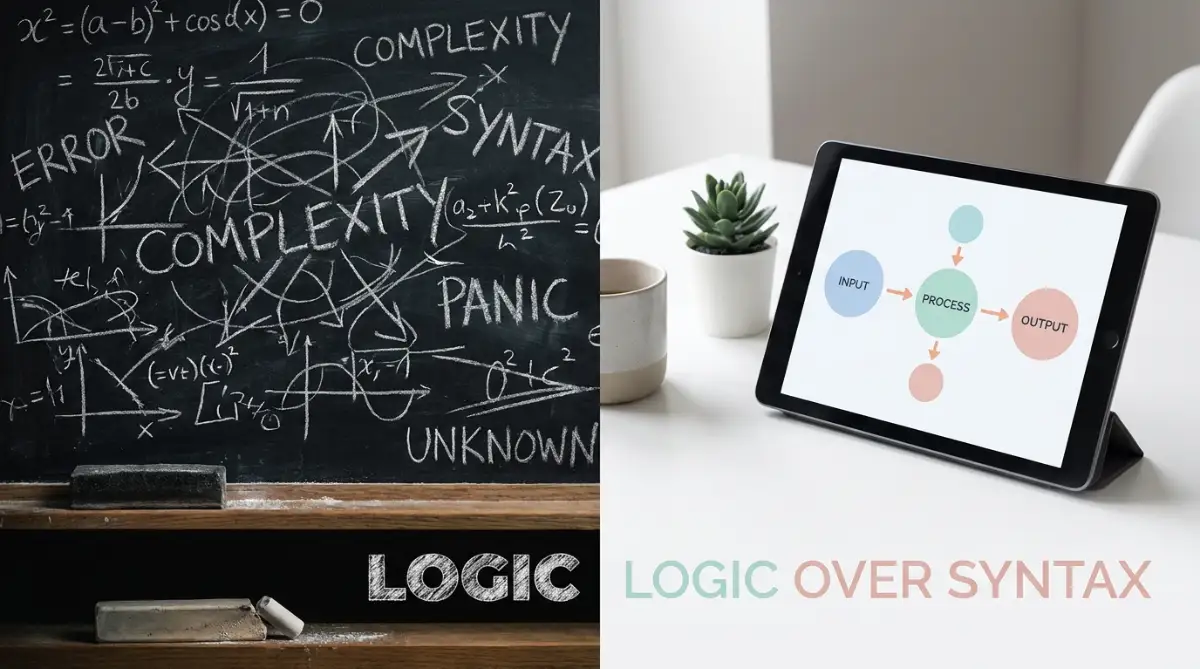
Quick Summary: What You Will Learn Today
- Why logic is way more important than learning complicated code.
- How to spot the "robotic tasks" in your day that are wasting your time.
- The exact steps to connect your favorite apps using simple drag-and-drop tools.
- Why planning on a piece of paper first will save your automated systems from breaking.
The Hidden Barrier Holding Your Productivity Hostage
The biggest hurdle you are facing right now has nothing to do with software. The real problem is the way you have been taught to think about technology. Whenever we hear words like algorithms, we instantly imagine movie scenes with green text scrolling down a black screen.
We assume that communicating with a machine requires a secret mathematical language. Because of this false belief, everyday professionals avoid fixing their broken daily routines. They choose the pain of manual labor over the perceived pain of learning something highly technical.
But an algorithm is not a piece of scary code that you have to memorize. An algorithm is simply a set of instructions designed to complete a specific task. When you follow a recipe to bake a cake, you are actually following an algorithm.
You gather your ingredients, you mix them in a specific order, and you apply heat for a set amount of time. If you can understand how to bake a cake, you already have the brainpower needed for algorithmic thinking.
Myth vs. Reality: The Automation Mindset
- The Myth: I need to learn complex programming languages to make my daily apps talk to each other.
- The Reality: If you can draw a simple flowchart on a paper napkin, you can use drag-and-drop platforms (like Zapier or Make) to do the exact same thing in five minutes. No math or coding required!
Why Logic Will Always Beat Syntax
To truly understand this concept, we need to separate logic from syntax. Syntax is the specific grammar and spelling required by a programming language like Python or JavaScript. If you miss a single comma or bracket in syntax, the whole program crashes.
This strict rulebook is exactly what scares normal people away from building automated systems. However, logic is completely different. Logic is just the natural human ability to say, "If this thing happens, then I want that thing to happen next."
Modern technology has evolved to a point where the software handles the syntax for you. Your only job is to provide the human logic. You are the architect drawing the blueprint, while the software acts as the construction worker doing the heavy lifting.
If you can map out your daily tasks on a piece of paper, you are completely ready to automate them. The focus has shifted from writing complex lines of text to simply connecting the dots.
Shifting to an Automation Mindset
Developing an automation mindset means changing how you view your daily responsibilities. Instead of seeing a massive mountain of work, you start seeing a series of small, connected steps. This is often called systems thinking.
When you get an email with an invoice, what is the very first thing you do? You probably download the attachment, open a specific folder, rename the file, and save it. Right now, you do this manually because it feels like a simple, harmless habit.
But a person with an automation mindset looks at that exact same process entirely differently. They see a trigger and a sequence of predictable actions.
The trigger is the arrival of the email with an invoice attached to it. The predictable actions are downloading, renaming, and saving to a destination. Because these steps never change, a machine can easily do them for you.
Visualizing Your Daily Workflow
You do not need to type commands to make this happen anymore. Today, building a workflow is just like playing with digital Lego blocks on your screen. You open a visual workspace and drag a block that represents your email inbox.
Then, you draw a line to another block that represents your cloud storage folder. The interface asks you simple, plain English questions like, "What folder should I put this in?" You select your answer from a drop-down menu, and the system is ready to go.

It is a highly visual, incredibly satisfying process that requires absolutely zero coding background. You are just clicking buttons and setting rules based on how you already work.
I want to share a quick realization from my own journey. Pro Tip: When I first discovered these visual drag-and-drop tools, I got way too excited and tried to automate a massive 15-step project all at once. I ended up confusing myself and the workflow completely broke down. I quickly learned that the best way to start is by automating just one tiny, two-step task at a time, like sending a Slack message when a new email arrives.
Are you ready to see exactly how simple this looks in action? Watch this short breakdown below to see how anyone can connect their daily apps without writing a single line of code.
The Scientific Reason Visual Mapping Works
There is a very logical reason why visual drag-and-drop interfaces feel so much better to use. Human brains are naturally wired to process visual information much faster than text-based information. When you look at a block diagram, your brain instantly understands the relationship between the different parts.
When you look at a wall of code, your brain has to work extremely hard just to translate the symbols. This heavy translation process causes a massive spike in cognitive load. Cognitive load is simply the amount of mental effort being used in your working memory.
When cognitive load gets too high, you feel stressed, confused, and you want to give up immediately. Visual workflow tools reduce this mental strain to almost zero. They allow your brain to stay focused on solving the actual problem rather than fighting with the software.
This means you can design complex, highly effective systems using the exact same mental energy it takes to organize your desk. By removing the need to memorize syntax, technology has finally leveled the playing field for everyone.
Identifying the Robotic Tasks in Your Life
The journey to working smarter begins with an audit of your own daily habits. You need to identify which parts of your day actually require human empathy and creativity. Everything else is likely a robotic task that a machine should be doing for you.
Do you copy information from a web form and paste it into a spreadsheet? That is a robotic task. Do you send the exact same welcome message to every new client? That is a robotic task. Do you manually create a new calendar event every time someone pays an invoice? That is also a robotic task.
These repetitive actions are the perfect candidates for your new visual workflow systems. You are the only person who knows exactly how your business or daily job operates. An expensive programmer does not know your clients, your folders, or your unique preferences.
Therefore, you are actually the most qualified person to build these systems for yourself. You simply needed the right mindset to realize that the power was in your hands all along.
The Anatomy of a Perfect Trigger and Action
To build your confidence, let us break down the exact anatomy of how modern systems communicate. Every single automated process in the world relies on two simple concepts: Triggers and Actions.
A trigger is an event that starts the whole process. Think of it like a motion sensor light outside your house. The light does not just stay on all day; it waits for something to happen. The trigger is someone walking past the sensor.
In your digital work life, a trigger could be receiving a new text message, a new row being added to a database, or a specific time of day hitting the clock. The system sits quietly in the background, constantly watching for this specific event to occur.
Once the trigger happens, the system immediately moves to the action phase. The action is the physical task you want the computer to perform. Going back to our house analogy, the action is the light bulb turning on.
In your work life, the action might be sending a pre-written email, updating a client's profile, or sending a notification to your phone.
Connecting Multiple Actions Together
The real magic happens when you realize you are not limited to just one action. You can easily chain multiple actions together from a single trigger. This creates a powerful domino effect that completes hours of work in a matter of seconds.
Imagine a new customer fills out a contact form on your website. That is your trigger.
Action one: The system automatically adds their name to your contact list.
Action two: It sends them a personalized welcome email.
Action three: It sends you a direct message so you know you have a new lead.
Here is a quick look at how normal people are combining everyday tools to buy back their free time:
You just accomplished three different tasks across three different applications instantly. You did not have to open a single app, and you definitely did not write any complicated scripts.

You simply sat down, dragged the right blocks into place, and told the system what your logical steps were. This is the exact moment when the fear of technology completely disappears.
You realize that algorithms are not your enemy. They are just highly obedient digital assistants waiting for your plain English instructions.
Overcoming the Fear of Breaking Things
One of the main reasons non-technical people avoid trying this is the fear of making a massive mistake. You might worry that clicking the wrong button will delete all your important files or send weird emails to your boss.
This fear is completely understandable, but modern platforms are designed specifically to protect you from yourself. These visual tools have built-in testing features that let you practice before anything goes live.
You can run a safe test to see exactly what will happen without actually affecting your real data. If a step is missing or the logic is broken, the platform will highlight the exact block in red. It will even give you a friendly hint on how to fix it.
You are allowed to experiment, make mistakes, and learn without any negative consequences. It is a completely safe sandbox environment built specifically for everyday professionals.
You do not need an IT department looking over your shoulder to make sure you are doing it right. You just need curiosity and the willingness to map out your logical thoughts.
Once you build your first successful system, a massive mental shift takes place. You stop looking at manual work as a necessary evil. Instead, you start looking at every repetitive task as a fun puzzle that you can easily solve.
This newfound confidence will completely change the way you manage your time, your business, and your daily life. You are no longer a victim of a heavy workload; you are the master of your own digital environment.
Designing Smart Workflows for Long-Term Success
Once you get past the initial fear and build your first working sequence, a whole new world opens up. You stop looking at your computer as a machine that forces you to do boring work. Instead, you start treating it like a highly capable assistant that just needs clear directions.
However, many people hit a plateau after setting up one or two basic connections. They automate a single email response but stop there because they are not sure what else is possible. If you truly want to save hours every single week, you need to start thinking bigger about how your systems talk to each other.
The secret to long-term success is not buying more expensive software or learning how to write scripts. The real secret is focusing heavily on standardizing your personal data before you even try to move it around. When you have a messy input, you will always get a messy output, no matter how good your workflow builder is.
If you are curious about setting up these basic data structures, you might find it helpful to learn how to automate repetitive data entry without writing a single line of code. This is the foundation of a truly scalable personal system.
Standardizing Your Daily Inputs
Think about how you currently receive information from clients, coworkers, or even family members. Right now, people probably send you messages on Slack, emails with weird subject lines, and texts at random hours. Because the information comes in randomly, a computer struggles to understand what to do with it.
To fix this, you must force people to give you information in a predictable format. Instead of letting a client email you a messy request, ask them to fill out a simple web form with specific fields. Once the information comes through a structured form, the system immediately knows exactly what name goes where.
This simple change takes zero technical ability, but it completely transforms how reliable your automated steps become. You are essentially teaching the system exactly what to expect every single time. According to a study on human-computer interaction principles, consistency is one of the most critical factors in reducing system errors.
Adding Delays and Conditions to Your Logic
As you get more comfortable, you will want your automated assistant to act a little smarter. This is where you introduce delays and simple conditions into your visual workspace. A delay is exactly what it sounds like—telling the system to wait before doing the next step.
For example, when someone signs up for your newsletter, you do not want to blast them with five emails instantly. You can easily drag a "delay" block into your sequence and set it to wait for exactly three days. This simple feature makes your communication feel incredibly natural and human, even though a machine is doing the work.
Conditions are also incredibly easy to set up using visual logic. A condition is just telling the system, "Only do this action if a specific rule is met." Imagine you have a contact form that asks for a budget size.
You can set a visual rule that says, "If the budget is over one thousand dollars, send me a text message right now." If the budget is lower, the system simply sends them a polite email and skips the text message step. You are building highly personalized, smart interactions without touching a single line of syntax.

The Hidden Traps That Break Visual Workflows
Even though visual logic tools are incredibly user-friendly, people still manage to create massive headaches for themselves. The biggest issue usually happens when someone gets overly excited and tries to automate a broken, chaotic process. If your current manual routine is a complete mess, pushing it into an automated system will just create a faster mess.
Many professionals refuse to map their steps out on paper first. They jump straight into the digital workspace and start connecting random apps together because it looks fun. This lack of planning almost always leads to infinite loops, where the system keeps sending the same email over and over again.
When your workflow breaks down because of poor planning, it causes a severe drop in confidence. You might incorrectly blame the software or tell yourself that you are just not smart enough to figure it out. This emotional frustration can push you right back into the terrible habit of doing everything manually.
Forgetting to Document the Machine's Job
Another silent trap is completely forgetting what you actually built. When a sequence runs perfectly in the background for six months, it becomes invisible to you. You stop thinking about how the invoice gets generated or how the welcome email goes out.
Suddenly, you decide to change the password on your email account or move a folder in your cloud storage. Because you forgot to tell the system about this change, the entire workflow completely breaks down in silence. By the time you notice, you might have missed out on ten new client leads or failed to send important documents.
Always keep a simple notebook or a digital document that lists exactly what triggers you have active. According to experts in process management standards, clear documentation is the only way to ensure a system survives long-term changes. If you do not track your own digital rules, you will eventually become trapped by the very systems you built to find freedom.
The Danger of Ignoring Human Connection
Perhaps the most damaging mistake is automating personal relationships just because you can. It is incredibly tempting to use visual tools to automatically send birthday wishes, follow-up texts, or generic thank-you notes. While the system can easily handle this, the person on the receiving end can almost always tell it is a robot.
If your clients or friends realize they are just interacting with a scheduled script, they will instantly lose trust in you. Your goal should never be to remove yourself completely from your own life or business. The goal is to let the machine handle the boring data entry so you have more energy to have real, human conversations.
Automation should always act behind the scenes to support your tasks, not act as a fake replacement for your voice. Use your newfound free time to actually pick up the phone and call someone instead of letting a trigger do it for you.
Embracing Your New Digital Freedom
Building an automation mindset completely changes the trajectory of your daily work life. You have learned that the scary, technical barrier to entry was actually just a myth designed to sell expensive software services. By focusing on simple visual logic instead of confusing syntax, anyone can become a master of their own routine.
You now understand that algorithms are simply step-by-step instructions that you already use every day. Whether you are baking a cake, managing a budget, or sorting your inbox, you are fully capable of mapping out systems. The power to reclaim hours of lost time is literally sitting right at your fingertips.
It is time to stop letting repetitive manual labor drain your energy and steal your peace of mind. Start small, map out one simple task on a piece of paper today, and watch how quickly your confidence grows. You do not need to wait for a computer science degree to start working much, much smarter.
I know exactly how intimidating it feels to look at a screen and think you are not technical enough. But the very first time I watched a system move my data automatically while I just sat back and sipped my coffee, my whole perspective changed. I promise you, once you take that first step and build your first visual sequence, you will never want to do data entry manually ever again.
Top Questions About Algorithmic Thinking Answered
Do I really need zero coding knowledge to use visual workflow tools?
Yes, you genuinely do not need any coding background at all. Modern visual platforms use simple drag-and-drop interfaces that handle all the complex programming in the background. If you can understand how to move files into a folder on your desktop, you can easily build these systems.
What is the best daily task to try automating first?
Start with something incredibly small that happens every single day, like managing incoming emails. A great first project is setting up a rule that automatically saves any email attachment from a specific person straight into a cloud folder. It is simple, highly effective, and instantly shows you how the logic works.
Will these systems break if I update my computer or phone?
Generally, no, because most of these visual automation tools are hosted entirely on the internet. They connect directly to the web versions of your favorite apps, so local updates on your physical devices do not affect them. However, if you change passwords or delete specific folders, you will need to update the rules in your workspace.
Is it expensive to start using these drag-and-drop platforms?
Not at all. Almost all the major visual workflow builders offer very generous free plans specifically for beginners. You only start paying when you are running hundreds of complex tasks a month, which usually means your business is growing anyway.
Disclaimer: The information provided in this article is for educational and informational purposes only. The software, strategies, and methodologies discussed may change over time, and individual results will vary based on personal usage and technical setup. Always read the terms of service of any third-party application before connecting it to your personal or business data.


