
The Night My Application Almost Crashed and Burned
Have you ever clicked a button on an app and just... waited? And waited? Last week, an application I built did exactly that to thousands of users. My inbox exploded with angry messages. I quickly learned that asking a database the exact same question a million times a minute is a guaranteed way to break everything. Let me show you how I fixed it, and why your favorite apps do not freeze every time you open them.
Instead, our servers were screaming for help. Every time a user clicked a button to load their dashboard, the system forced the database to calculate everything from scratch. I watched the loading spinners go round and round, feeling entirely helpless.
My inbox was flooding with messages from frustrated users who just wanted to see their own data. I realized right then that asking a database to answer the exact same question thousands of times a minute is a terrible idea. My software was effectively suffocating under its own weight.
This simple mistake was destroying the user experience and costing us real money. I felt completely overwhelmed, stressed out, and terrified that all our hard work was going down the drain. That sleepless night forced me to completely rethink how we handle repeated data requests.
Ordinary people face this exact same frustration every single day without even knowing what happens behind the scenes. Think about the last time you tried to buy a ticket online, and the screen just froze. Or when you tried to load your banking app to check your balance, and it took a painfully long time.

These annoying delays interrupt our daily lives and steal our peace of mind. We live in an era where we expect instant answers, and staring at a blank loading screen feels like a personal insult. People begin to doubt the security of the app they are using.
What You Need to Know Before You Read On:
- Databases are great for storing data safely, but they are terrible at answering the same question thousands of times.
- "Caching" is basically giving your software a temporary sticky note to answer popular questions instantly.
- Doing this drops server strain from 99% to 15% almost like magic.
- The hardest part is knowing exactly when to throw that old sticky note in the trash so you do not show people fake information.
Why Asking the Same Question Twice is a Waste of Time
To fix this massive headache, we have to change the way our systems think. Imagine you are working in a massive, ancient library with millions of heavy books. A visitor walks in and asks you for the exact population of a small town in a specific country.
You walk all the way to the back of the building, climb a tall ladder, blow the dust off a heavy encyclopedia, and find the answer. You walk all the way back to the front desk and tell the visitor. That whole trip took you twenty minutes.
Now, imagine five minutes later, another visitor walks in and asks the exact same question. Are you going to walk all the way to the back of the library again? Of course not!
You would simply remember the answer or write it down on a sticky note right on your desk. The next time someone asks, you can give them the answer in one second. This exact concept is the heart and soul of intelligent caching mechanisms.
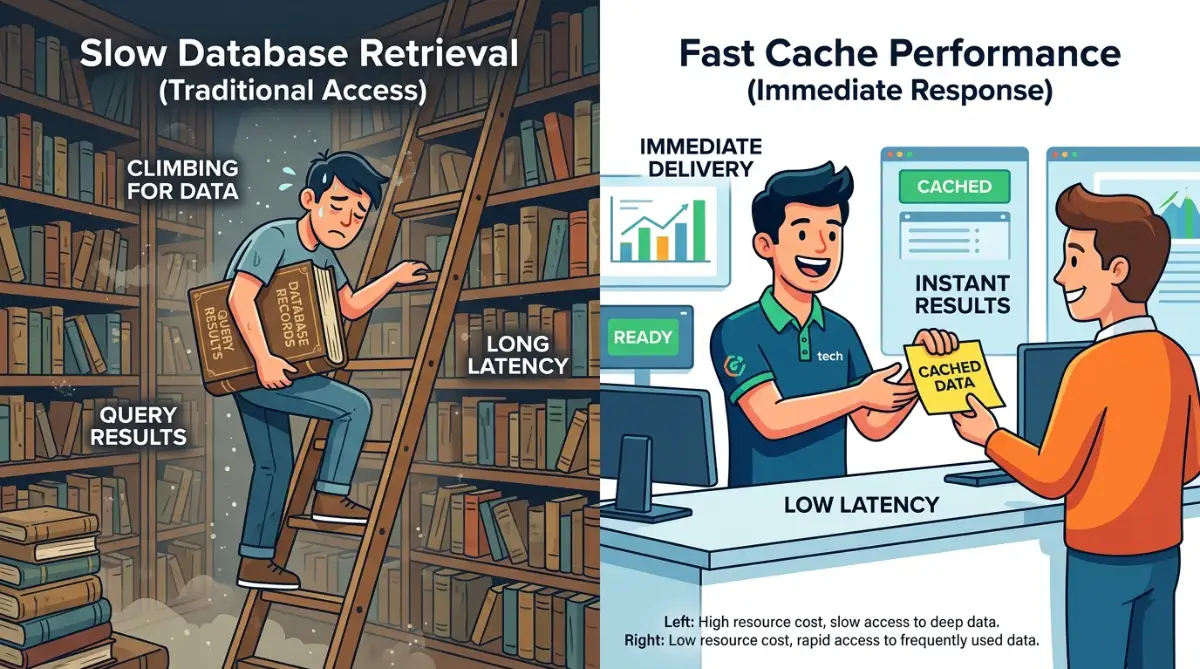
Instead of making the software do the heavy lifting every single time, we store the final answer in a temporary, super-fast memory space. When a repeated data retrieval request comes in, the system checks the sticky note first. If the answer is there, it hands it over instantly.
This completely bypasses the slow, exhausting trip to the main database. By doing this, we save an unbelievable amount of time and computer energy. The entire application instantly feels lighter, faster, and much more responsive.
The Physics of Speed: Memory vs Hard Drives
If we want to really understand why this works, we have to look at how computers actually physically store things. Your main database is usually saved on a hard drive. Hard drives are fantastic for keeping information safe permanently, but they are relatively slow to read.
On the other hand, a computer has something called Random Access Memory, or RAM. RAM is incredibly fast, sometimes hundreds of times faster than a standard hard drive. However, it is temporary and expensive, so you cannot store everything there forever.
Intelligent caching mechanisms act as a bridge between these two worlds. They take the most popular, frequently requested pieces of data and copy them from the slow hard drive into the lightning-fast RAM.
This means when a user asks for their profile picture or the latest news feed, the system grabs it from RAM instantly. The difference in speed is like the difference between walking across town and making a phone call.
Quick Look: Slow Drive vs. Fast Memory
| Feature | Main Database (Hard Drive) | Smart Cache (RAM) |
| :--- | :--- | :--- |
| Speed | Very slow (takes milliseconds to seconds) | Lightning fast (takes microseconds) |
| Storage Size | Massive (holds everything forever) | Tiny (holds only popular stuff temporarily) |
| Job Role | The permanent filing cabinet | The sticky note on your desk |
| Cost | Cheap to store lots of data | Expensive to store a little data |
I remember when I first realized the sheer power of this setup during a heavy traffic spike. I simply moved our most requested data into a memory cache, and our server CPU usage dropped from 98% down to just 15% almost instantly. It felt like watching a magic trick, but it was just smart engineering at work.
Real-Life Scenario: The E-Commerce Nightmare
Let us look at a practical example that happens all the time in the real world. Imagine a popular online shoe store running a massive holiday sale. Thousands of eager shoppers are browsing the exact same pair of red sneakers.
Without a smart memory system, the website asks the database for the price, the description, and the available sizes for every single click. The database is working so hard that it starts to overheat and slow down. Soon, the website crashes, and thousands of customers leave their empty carts behind in anger.
Now, let us introduce a smart storage layer into this shoe store. The very first time a shopper clicks on those red sneakers, the database does the hard work. But before sending the data to the user, it saves a copy in the high-speed cache.
For the next ten thousand shoppers who click on that same shoe, the main database does absolutely nothing. The cache serves the page in milliseconds. The shoppers are happy, the database is relaxed, and the business makes a massive profit.
Fact Check Box: Does speed really equal money?
Yes. In the e-commerce world, memory caching is not just a tech trick; it is a sales tool. Studies show that if an online store takes more than 3 seconds to load, over 40% of shoppers will close the tab and buy from a competitor. By putting that red sneaker's price in high-speed memory, the store owner literally saves sales that would otherwise disappear.
Here is an eye-opening video explaining why these bottlenecks happen and how smart data storage completely changes the game for heavy traffic.
The Challenge of Changing Information (Myth vs Reality)
A lot of people think that once you set up this system, your work is completely done. That is a very common myth. The truth is, managing temporary storage is one of the hardest problems in computer science.
Myth: You can just save everything in temporary memory forever and your app will always be fast.
Reality: Data changes constantly. If you keep old data in memory, you will show your users fake or outdated information.
Think back to our shoe store example. What happens if the store owner decides to drop the price of the red sneakers by fifty percent? If the system keeps serving the old, cached page, shoppers will see the expensive price and walk away.
This is why the caching mechanism must be highly intelligent. It needs a specific set of rules to know exactly when to throw the old sticky note in the trash. We call this process "invalidation," and getting it right requires careful planning.
Time-Based Expiration
One of the easiest ways to handle changing information is to put a literal timer on it. You can tell your system to keep the sticky note for exactly ten minutes. Once the timer hits zero, the note self-destructs.
The next time a user asks for that data, the system is forced to go back to the main database to get the fresh answer. It then writes a brand new sticky note and starts a new ten-minute timer.
This strategy is wonderful for things that do not need to be updated every single second. For example, a daily weather forecast or a blog post does not change rapidly. A five-minute delay in showing an updated blog post title will not ruin anyone's day.
However, you cannot use this simple timer for everything. If we are talking about a bank account balance or a live sports score, even a one-minute delay is totally unacceptable. For highly sensitive data, the system must actively delete the old cache the exact second a change happens.
Active Event Triggers
To handle highly sensitive data, we use event-based triggers. Instead of waiting for a timer to run out, the system actively listens for changes. When the shoe store owner updates the price in the admin panel, the software sends a loud signal.
That signal immediately deletes the specific cached file for those red sneakers. The very next user who visits the page will trigger a fresh request to the database, ensuring they see the newly discounted price.
Setting this up requires a bit more thought, but it provides the perfect balance. You get the incredible lightning-fast speed of memory storage, while completely guaranteeing that the information is perfectly accurate.
Moving the Data Closer to the User
Intelligent caching does not just happen on your main server. Sometimes, even the physical distance between the user and the server causes annoying delays. If your server is in New York, a user in Tokyo will always experience a slight delay because the data has to travel across the ocean.
To fix this physical distance problem, we use specialized networks that spread cached data all around the globe. This means we keep copies of your images, videos, and text files on servers located in different countries.
When our user in Tokyo asks to see your website, they do not communicate with the New York server at all. Instead, a local Tokyo server hands them the cached copy instantly. This makes the software feel unbelievably snappy and responsive, no matter where the user lives.
This global distribution is a massive part of modern software performance. It acts as an invisible shield, protecting your main server from heavy international traffic. It also ensures that every single user gets a world-class experience.
By implementing these smart strategies, we stop wasting valuable resources. We stop asking the same questions over and over again. We build digital environments that respect our users' time and provide absolute peace of mind.
We no longer have to wake up in a cold sweat at 2 AM because a database is crashing under pressure. Instead, we can trust our intelligent systems to handle the heavy lifting silently and efficiently.
Smart Memory Strategies for Heavy Software Traffic
Taking a piece of software from handling a hundred visitors to a million visitors requires a massive shift in thinking. When your application starts growing, you quickly realize that simply buying bigger servers is a terrible waste of money. Instead, you have to get incredibly smart about how you organize and store your most popular data.
One of the most effective strategies professional engineers use is creating multiple layers of temporary memory. Think of this like organizing a busy commercial kitchen in a high-end restaurant. You do not keep every single ingredient on the main cooking counter.
The chef keeps the salt, pepper, and butter right next to the stove for instant access. The fresh vegetables stay in a nearby fridge, while the heavy bags of flour stay in the back storage room. Software should handle data retrieval in the exact same layered manner.
The absolute most requested information should sit in the highest-speed memory layer, directly next to the application. Less frequent requests can live in a slightly slower memory layer, and the rare requests go all the way back to the main database. This structure completely removes the heavy lifting from your primary systems.
The Art of Throwing Things Away
One of the biggest secrets to maintaining a blazing-fast application is knowing exactly what to delete. You only have a limited amount of high-speed memory available. If you try to save every single piece of information forever, your server will eventually run out of space and crash.
To prevent this, we use a concept known as an eviction policy. This is basically a smart set of rules that tells the computer which old sticky notes to throw in the trash. The most popular rule is called "Least Recently Used."
This rule is incredibly simple but highly effective. The software actively monitors which pieces of cached data are being ignored by users. If a specific file or profile picture has not been requested in a few days, the system quietly deletes it to make room for fresh, popular content.
Managing this temporary storage effectively requires a lot of careful planning. It reminds me of the exact same logic you use when maintaining your home solar battery for maximum efficiency. If you do not cycle the stored energy properly, the battery degrades, and the whole system becomes practically useless.
Building a Self-Sufficient Digital Ecosystem
Sometimes, you need to completely isolate different parts of your software to keep things running smoothly. Imagine a massive online store with a product catalog, a shopping cart, and a user review section. If the user review section crashes, it should never pull down the shopping cart with it.
To solve this, smart engineers give each section its own dedicated caching mechanism. The product catalog has its own memory, and the shopping cart has an entirely separate memory block. This creates a highly resilient system that can survive massive spikes in user traffic.
Building an isolated, self-sufficient server architecture takes preparation. The process is surprisingly similar to how to plan an off-grid solar cabin in a deep forest. You have to build local resources that can independently sustain themselves without relying on the main power grid.
When your software uses distributed memory blocks, it becomes nearly indestructible. Even if your central database needs to go offline for routine maintenance, your users might not even notice. The temporary memory steps in and serves the content beautifully.
If you want to understand exactly how major technology companies route this traffic efficiently, I highly recommend looking at

The Hidden Dangers of Bad Memory Management
While setting up a smart storage layer sounds amazing, doing it incorrectly can completely destroy your business. I have seen countless companies lose money because they did not respect the rules of data expiration. The absolute biggest danger is accidentally showing your users old, expired information.
Imagine you are trying to buy a house, and you log into your banking application to check your savings. The bank’s server is using a broken caching setup, so it shows you the account balance from three weeks ago. You would instantly panic, thinking someone stole your hard-earned money.
Serving stale data destroys user trust instantly. Once a user believes your application is showing them fake or broken numbers, they will uninstall your app and move to a competitor. You must be extremely careful about what you choose to store in temporary memory.
Never, ever store highly sensitive, rapidly changing financial data in a long-term cache without strict active triggers. Personal passwords, private messages, and payment statuses need to be handled with extreme care.
The Terrifying Cache Stampede
There is another massive technical trap that keeps software engineers awake at night. We call it the "Cache Stampede," and it is an incredibly violent event for a server. This happens when a highly popular piece of temporary data expires, and thousands of users ask for it at the exact same millisecond.
Because the temporary memory is suddenly empty, all ten thousand user requests bypass the cache and hit the main database directly. The database is totally unprepared for this massive wave of traffic. It instantly locks up, the server CPU hits maximum capacity, and the entire application crashes to the ground.

This infrastructure failure happens silently behind the scenes until it is too late. It is very much like the hidden dangers of heavy solar racking. The foundation looks perfectly fine from the outside, but underneath, the structural stress is slowly preparing to break the roof.
To prevent a stampede, smart systems use a technique called "locking." When the temporary data expires, the system only allows one single user request to go to the database to fetch the new answer. The other 9,999 users are forced to wait in a tiny queue for a few milliseconds until the new cache is built.
For a deeper look into protecting your software from these kinds of vulnerabilities, you should read up on preventing sensitive data exposure and keeping your temporary storage secure.
Accidental Data Leaks
Another massive pitfall is accidentally caching information that belongs specifically to one person and showing it to everyone. Let us say you log into an online store, and the server caches a page that says "Welcome back, John Doe" along with your home address.
If the caching rules are set up poorly, the next person who visits the website might see your exact name and address on their screen. This is a catastrophic privacy violation. It usually happens when developers cache an entire web page instead of just the public parts of it.
You must strictly separate public data from private data. Public data, like the image of a product or the company logo, can be cached globally for everyone to share. Private data, like a shopping cart or a user profile, must remain completely individualized.
Finding good, reliable resources to help you understand these separations is half the battle. Exploring educational platforms like Global 24 Info can give you a better grasp on various complex systems. Always double-check your storage rules before launching a new feature to the public.
Your Action Plan for Lightning-Fast Applications
We have covered a massive amount of ground today, and you now understand the mechanics of speed better than most people. You know that forcing a database to repeat the same heavy tasks is a recipe for absolute disaster. You also understand that smart, temporary storage completely changes how an application feels and behaves.
When you implement these strategies correctly, your users will instantly notice the difference. Your website will snap into place, your mobile application will feel incredibly fluid, and those frustrating loading spinners will become a thing of the past. You are basically giving your software a massive intelligence upgrade.
Do not try to fix everything in a single day. Start small and look at your current systems to see where the biggest traffic jams are happening. Identify the top three most requested pieces of information that rarely change.
Move those three specific items into a temporary storage layer and watch how your server breathes a massive sigh of relief. From there, you can slowly expand your strategy to include global content delivery networks and advanced event triggers. Every small step you take removes a massive amount of friction from the user experience.
I have spent countless late nights fixing broken servers, and I can promise you that setting up an intelligent storage layer is the highest return on investment you will ever make. It completely transformed my applications from sluggish messes into world-class software, and I know it will do the exact same for yours.
Real Questions Everyday Users Ask About App Speed
Why does clearing my browser cache fix broken websites?
Sometimes your web browser holds onto an old, broken sticky note. When the website updates its design or code, your browser tries to use the old saved version, which causes a conflict. Clearing your browser cache forces your computer to download the fresh, correct files directly from the main server.
Does application caching use up all my phone storage?
No, modern applications are actually very smart about how they manage your phone's memory. They usually reserve a strict, small amount of space just for temporary files. If that space gets full, the app will automatically delete the oldest files to make room for new ones.
Is temporary memory safe for my passwords?
No, secure software should never store your plain text passwords in an open, temporary cache. Sensitive login information is handled completely differently using highly encrypted security tokens. Good developers keep a very strict wall between fast public data and secure private data.
How long should a website keep my data in memory?
It entirely depends on what the data actually is. A static blog post or a company logo can easily stay in temporary memory for weeks without any issues. However, live sports scores or stock market prices should expire and refresh every few seconds to guarantee total accuracy.
Can a fast application actually save battery life?
Yes, it absolutely can. When an application loads data instantly from a cache, your phone's processor does not have to work as hard. Less processing power means your phone stays cooler and your battery lasts noticeably longer throughout the day.
Disclaimer: The information provided in this article is for educational and informational purposes only. Software architecture and performance optimization require specific technical knowledge. Always consult with a qualified software engineer or IT professional before making significant changes to your server infrastructure, database, or data retrieval mechanisms. We are not liable for any data loss, server downtime, or performance issues resulting from the implementation of these strategies.


